


If you bought a Razer Gold PIN and want to redeem it for Mobile Legends Diamonds, you’re in the right place. A lot of players get stuck because the process has two separate steps, and it’s not obvious from the start. This guide walks you through the whole thing from start to finish, whether you bought your PIN from GCash, Lazada, Shopee, or any other platform.
What You Need Before You Start
Before jumping in, have these ready:
- Your Razer Gold PIN. Check your SMS or confirmation email. The serial number is 10 digits and the PIN code is 14 digits.
- A Razer ID account. Free to create at gold.razer.com. You need this to access your Razer Gold wallet.
- Your ML User ID. Open Mobile Legends, tap your avatar in the top left corner, go to Basic Info, and your User ID is shown below your nickname. The longer number is your User ID and the shorter number in brackets is your Zone ID.

How can I redeem my Razer Gold PIN for Mobile Legends?
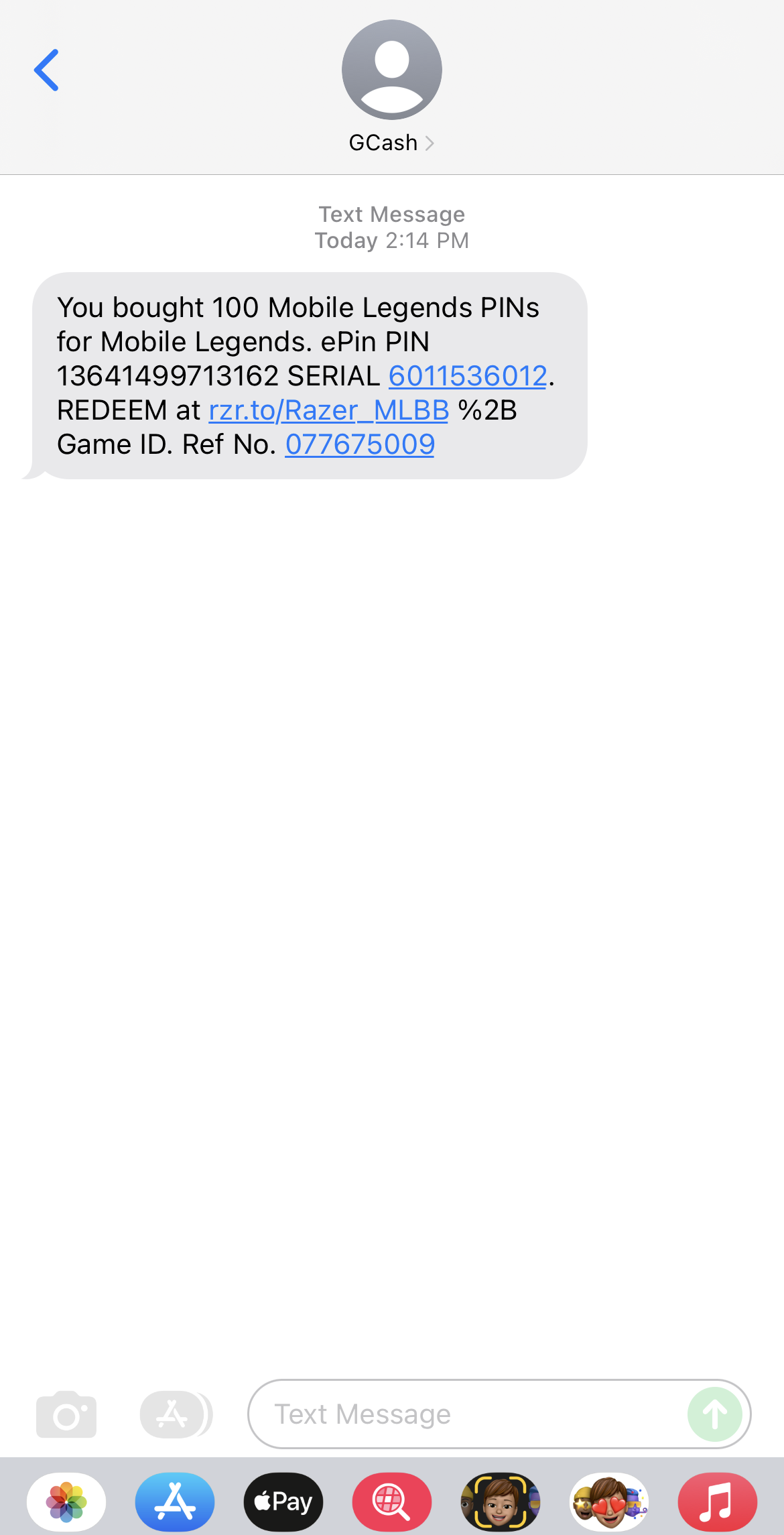
- After successfully buying Razer Gold PIN in the GCash app, they will send a confirmation receipt and a PIN.

- Next, visit https://gold.razer.com/, and you need to log in to your Razer Gold account.
- After logging in, click on the RELOAD button on the menu bar.
- Choose Razer Gold PIN as your payment method.

- Enter your PIN details.

- Click on the Next button, and you have now reloaded your account.

- Go back to https://gold.razer.com, and choose Mobile Legends.
- Enter your Game User ID, choose the amount of ML dias you want to recharge.
- Select Razer Gold PIN for the payment method, checkout and pass the verification code.
- Congratulations! You have now recharged your dias in ML.



Note: You need to make sure that you have a Razer Gold account before you can redeem your Razer Gold PIN.
How to Buy a Razer Gold PIN Using GCash
If you still need to buy your PIN, the easiest way in the Philippines is through the GCash app.
- Open the GCash app and tap Load.
- Tap Non-Telco, then enter your mobile number.
- Search for Razer Gold and select your denomination.
- Confirm the payment using your GCash balance.
- Your PIN will arrive via SMS and confirmation email shortly after.
You can also buy Razer Gold PINs from Lazada and Shopee using GCash as payment. Just make sure you’re buying from a verified seller on both platforms.
💡 One thing worth knowing: if you try to buy Razer Gold directly on the gold.razer.com website using GCash, there’s an extra Php 10 Dragonpay transaction fee on top of your purchase. Buying a PIN through the GCash app first and then redeeming it is the cheaper route.
How to Reload Your Razer Gold Wallet with a PIN
This step loads your PIN value into your Razer Gold wallet. You need to do this before you can buy anything.
- Go to gold.razer.com and log in to your Razer ID account.
- Click Gold in the top menu, then select Reload Now.
- Choose Razer Gold PIN as your reload method.
- Enter your Serial number and PIN code exactly as they appear on your receipt.
- Click Next and complete the reCAPTCHA verification.
- Your wallet balance is now updated.
That’s the first half done. Your Razer Gold wallet now has the value of your PIN loaded in and ready to use.
How to Buy ML Diamonds Using Your Razer Gold Wallet
Now that your wallet is loaded, here’s how to use it to top up Mobile Legends.
- Go to gold.razer.com and find Mobile Legends: Bang Bang in the game catalog.
- Enter your ML User ID and email address.
- Select the Diamond amount you want to purchase.
- Choose Razer Gold Wallet as your payment method.
- Click Checkout and complete the OTP verification.
- Done. Your Diamonds will appear in your ML account instantly.
Razer Gold vs Codashop: Which One Should You Use for ML?
Both are legitimate and work well, but they suit different players.
Codashop is faster and simpler. You enter your User ID, pick a Diamond pack, pay with GCash, and Diamonds arrive instantly without needing a wallet or account. It also has bonus Diamonds on every recharge, the Weekly Diamond Pass, the Twilight Pass, and bundle deals. If ML is the main game you spend on, check out our Codashop ML top-up guide for the full breakdown on bonus Diamonds, passes, and bundle deals.
Razer Gold is worth it if you play multiple games. Your wallet balance works across hundreds of titles including PUBG Mobile, Genshin Impact, Valorant, and more. Every transaction also earns you Razer Silver, a loyalty reward you can exchange for gaming gear and vouchers. If you’re spreading your budget across different games, having a Razer Gold wallet makes sense.
For ML-only players, Codashop is the better default. For multi-game players, Razer Gold gives you more flexibility.
FAQ: Razer Gold PIN for Mobile Legends
Yes. You need a free Razer ID to access your wallet and redeem your PIN at gold.razer.com.
Yes. The easiest way is through the GCash app under Load then Non-Telco. You can also buy from Lazada and Shopee using GCash as payment, just stick to verified sellers.
aying via GCash on the Razer Gold website goes through a third-party processor (Dragonpay), which adds a Php 10 fee. Buying a PIN through the GCash app and then redeeming it avoids that fee.
Diamonds are credited instantly once you complete the checkout on the Razer Gold website.
Yes. Once reloaded, your wallet balance can be used for any game in the Razer Gold catalog.
Contact Razer Gold support directly at gold.razer.com with your purchase receipt as proof. If you bought from an unauthorized third-party seller, unfortunately there’s limited recourse, which is why buying from GCash, Lazada verified sellers, or Shopee is important.
Yes. Razer Gold is an official payment platform used by millions of players. Always buy PINs from authorized sellers to avoid invalid or used codes.












Leave a comment