


Latest Update (September 17, 2026): This guide on how to recharge Diamonds in ML using GCash now includes the new app flow and Codashop promos.
If you want to recharge diamonds in ML using GCash, the process is quick and secure. This guide walks you through step-by-step methods on how to buy ML diamonds with GCash through Codashop or directly in the GCash app. You’ll also learn about bonus Diamonds, Codashop promos, and tips to get the most value from every recharge.
Just follow the quick steps below to start buying ML Dias safely and hassle-free.
💡 Want bonus Diamonds on every top-up? Top up here.
How to Find Your User ID and Zone ID in ML
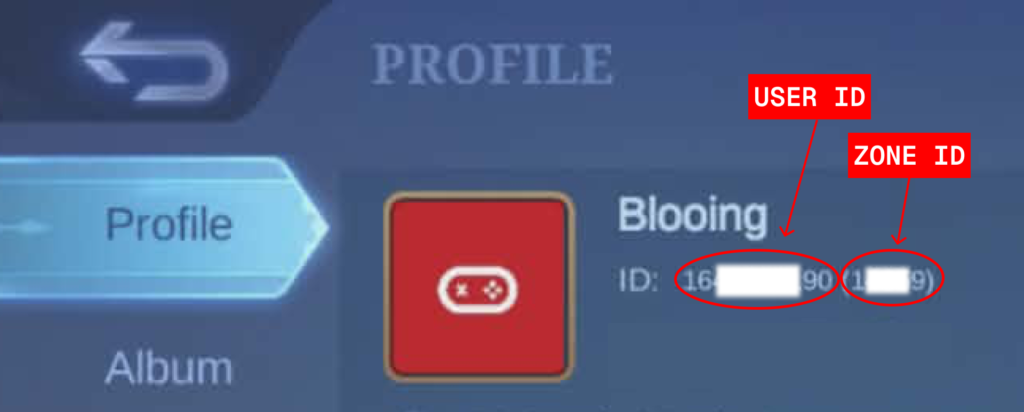
Before you can recharge diamonds in ML using Gcash on Codashop, you’ll need two things: your User ID and your Zone ID. Both are found in the same place inside the game.
- Open Mobile Legends and tap your avatar in the top left corner of the main screen.
- Your User ID and Zone ID appear directly below your nickname on the profile screen. The longer number is your User ID and the shorter number in brackets is your Zone ID, for example: 12345678 (1234).
Tap the number to copy it, then paste it straight into Codashop. It takes two seconds and saves you from sending Diamonds to the wrong account, which Codashop cannot reverse.
How to Buy Mobile Legends Diamonds with GCash in the App
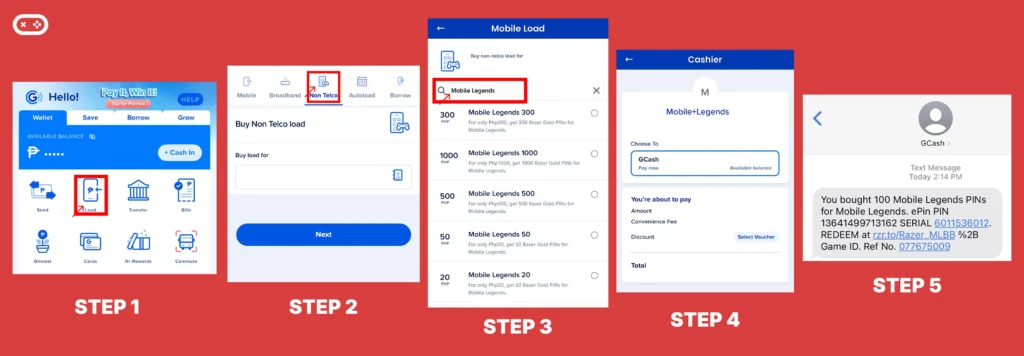
You don’t always have to use Codashop to recharge. The GCash app also lets you buy Mobile Legends Diamonds by purchasing a redeemable PIN. This is a handy option if you want to gift Diamonds to someone or keep a code for later use.
Here’s how to do it step-by-step:
- Open your Gcash App and tap on the Load.
- Tap on Non-Telco and enter your mobile number.
- In the search bar, type Mobile Legends, then choose the Diamond package you want to buy.
- Pay using your GCash balance.
- Wait for the confirmation SMS with your PIN code.
- You will receive a confirmation text and the PIN from GCash.
Once you’ve completed your purchase, open Mobile Legends, head to the redemption section, and enter your PIN to claim your Diamonds instantly. This method is quick, secure, and lets you top up without ever leaving the GCash app.
How to Recharge Diamonds in ML Using Gcash in Codashop
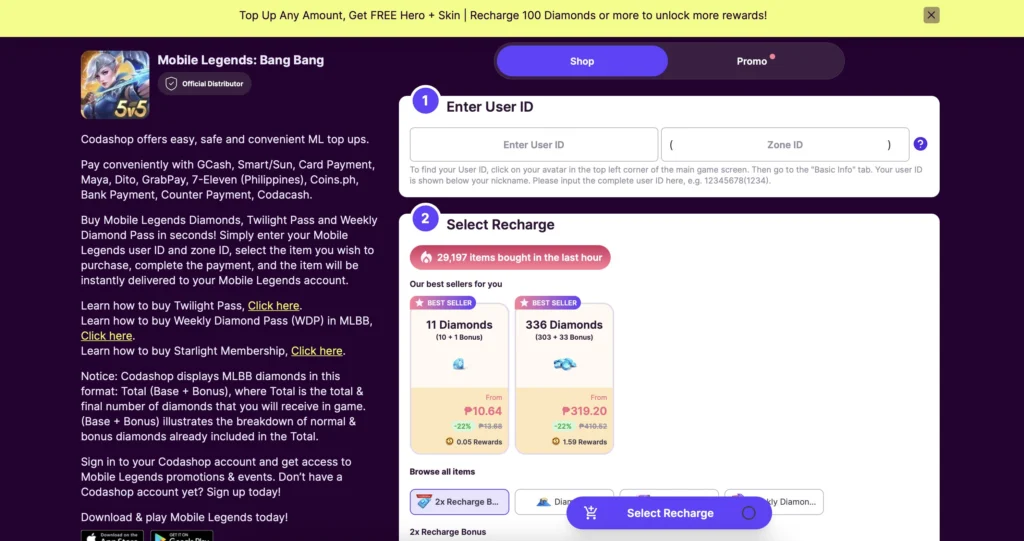
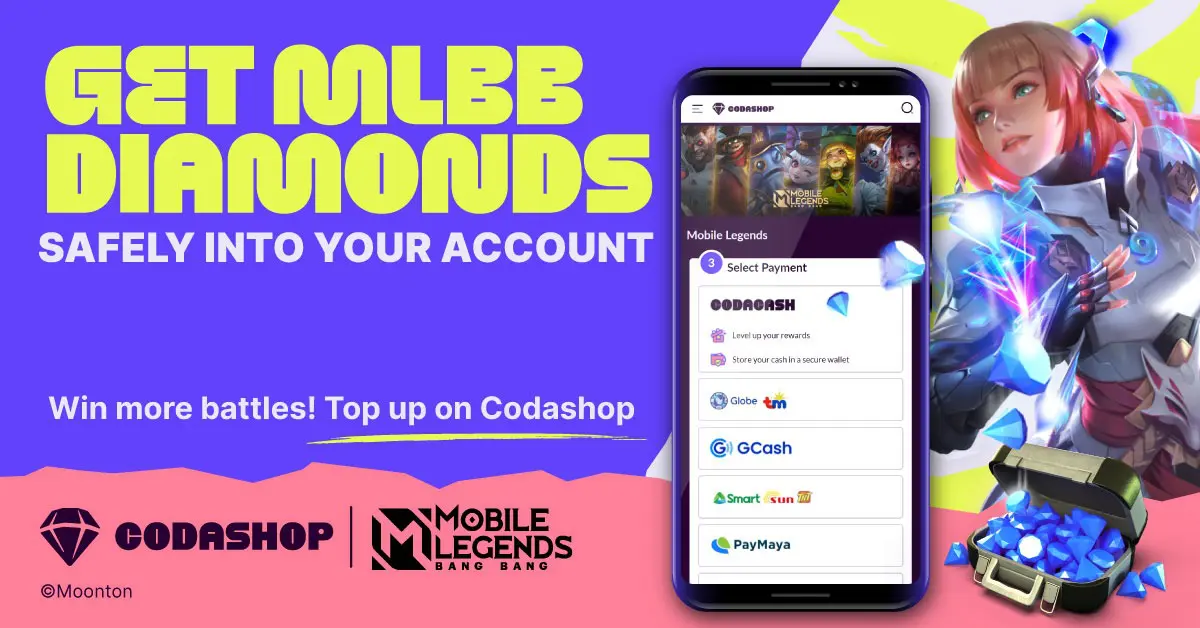
If you’d rather recharge Diamonds in ML using GCash through Codashop, the process is just as simple. You won’t need a PIN, just enter your ML details, select your top-up amount, and choose GCash as your payment method. Everything’s done in a few taps, and your Diamonds are sent straight to your account. Fast, easy, and no extra steps.
Follow these steps to recharge using GCash on Codashop:
- Click here to go to the Codashop website.
- Enter your User ID and Zone ID.
- Select the amount of Diamond Recharge you want.
- Choose GCash as your payment method.
- Click Buy Now, finish the verification process, and you’re done.
Buy ML Diamonds In-Game Using GCash
If your GCash account is already linked to your Google Play or Apple App Store, you can recharge Diamonds in ML using GCash without leaving Mobile Legends at all.
- Open Mobile Legends and tap the + icon next to your Diamond balance at the top of the screen.
- Select the Diamond pack you want.
- On the payment screen, choose GCash as your payment method (via Google Play or App Store).
- Confirm the purchase. Diamonds are credited instantly.
Before you start, make sure GCash is added as a payment method in your app store settings. If it is not linked yet, go to your Google Play or App Store payment settings and add it first. It takes about two minutes.
One thing worth knowing: prices through the in-game store can be slightly higher than Codashop due to platform fees charged by Google Play and the App Store. If you are topping up a large amount, Codashop will usually save you a bit more.
Codashop ML Free Diamonds (2026)
Every recharge through Codashop includes bonus Diamonds, credited automatically after payment. Here’s the updated breakdown:
| Diamonds to Buy in Codashop | Free Diamonds | Price | Total Diamonds You Get | Codashop Rewards | Value Pick |
| 5 | – | ₱5.50 | 5 | – | |
| 10 | 1 | ₱10.64 | 11 | 0.05 Rewards | |
| 20 | 2 | ₱21.28 | 22 | 0.09 Rewards | |
| 51 | 5 | ₱53.20 | 56 | 0.23 Rewards | |
| 102 | 10 | ₱106.40 | 112 | 0.47 Rewards | Starter Pick |
| 203 | 20 | ₱212.80 | 223 | 0.95 Rewards | |
| 303 | 33 | ₱319.20 | 336 | 1.59 Rewards | |
| 504 | 66 | ₱532.00 | 570 | 2.37 Rewards | |
| 1007 | 156 | ₱1,064.00 | 1163 | 4.75 Rewards | Best Value |
| 2015 | 383 | ₱2,128.00 | 2398 | 9.50 Rewards | |
| 5035 | 1007 | ₱5,320.00 | 6042 | 23.75 Rewards | Whale Pick |
Takeaway:
- Starter Pick (102 Diamonds): best for new players testing Codashop with GCash.
- Best Value (1007 Diamonds): top pick if you recharge regularly.
- Whale Pick (5035 Diamonds): maximum rewards if you’re saving for skins or events.
Yes — all of these packs are available through GCash Mobile Legends recharge on Codashop.
ML Recharge Benefits
Topping up through Codashop comes with more than just bonus Diamonds. If it’s your first-ever recharge, some packs even give a 2x Diamond bonus. For example, a 50-Diamond purchase credits you with 100 Diamonds on your first top-up.
Every recharge also earns Codashop Rewards points, which you can later exchange for vouchers and perks. It’s a nice extra layer of value if you recharge often.
One more thing worth knowing: not all payment methods cost the same on Codashop. GCash, Maya, and GrabPay give you the lowest price per Diamond. If you’re topping up regularly, always use one of these three over load or card payments to stretch your budget further.
Codashop ML Weekly Diamond Pass
The Weekly Diamond Pass is one of the most affordable ways to build up Diamonds without dropping a large amount at once. For ₱105, you get a steady flow of Diamonds over a full week instead of a single lump sum.
What you get for ₱105
- Instant reward: 80 Diamonds
- Daily reward: 20 Diamonds × 7 days (140 Diamonds)
- Total: 220 Diamonds in one week
That’s more than double the value of buying a one-time Diamond pack at the same price point.
Weekly Limited Elite Bundle
The Weekly Limited Elite Bundle is a small, low-cost bundle that adds extra value on top of a Diamond purchase. It’s designed for players who already plan to recharge and want bonus resources without increasing their spend too much.
What you get
When you purchase 55 Diamonds, you also receive:
- Crystal of Aurora ×20
- Rare Skin Fragment ×2
- 4-Win BP Card ×1
Price
- ₱53.15 (discounted)
This bundle refreshes weekly, making it an easy pickup if you’re consistently playing and participating in events.
Monthly Limited Epic Bundle
The Monthly Limited Epic Bundle is the higher-value version, aimed at players who want a noticeable boost in premium resources over the course of a month.
What you get
When you purchase 275 Diamonds, you also receive:
- Crystal of Aurora ×180
- Rare Skin Fragment ×10
- 10-Win BP Card ×1
Price
- ₱261.74 (discounted)
Because it only refreshes monthly, this bundle is best used strategically especially during draw-heavy events or when you’re close to completing a skin fragment set.
Weekly vs Monthly Limited Bundles (Quick Comparison)
| Bundle | Price | Diamonds Required | Best for |
|---|---|---|---|
| Weekly Limited Elite | ₱53.15 | 55 | Light spenders, weekly players |
| Monthly Limited Epic | ₱261.74 | 275 | Event-focused, long-term players |
Codashop ML Twilight Pass
The Twilight Pass is a one-time purchase available on Codashop for ₱532. Unlike the Weekly Diamond Pass which you can buy repeatedly, the Twilight Pass can only be purchased once per account, so it’s worth knowing exactly what you’re getting before you commit.
Instead of giving you Diamonds directly, the Twilight Pass gives you Tickets, a separate currency you earn on purchase and through leveling up the pass. You use those Tickets in the Twilight Exchange to redeem skins and exclusive rewards.
What you get
| Level | Rewards |
| Instant | 200 Tickets, Glorious General Trial Card x1, Diamond Hero Trial Card (1-Day) x1 |
| Level 8 | 200 Tickets, Eudora “Flame Red Lips” Skin, Diamond Hero Trial Card (1-Day) x2 |
| Level 10 | 300 Tickets, Star Protection Card x1, Deluxe Skin Trial Card (1-Day) x2 |
| Level 12 | 350 Tickets, Double EXP Card (3-Days) x1, Luxury Ticket x5 |
| Level 15 | 350 Tickets, Miya “Suzuhime” Skin, Epic Skin Trial Card (1-Day) x2 |
| Level 20 | 500 Tickets, Twilight Pass Avatar Border, Luxury Ticket x10 |
How to buy the Twilight Pass on Codashop
- Go to Codashop.
- Enter your MLBB User ID and Zone ID.
- Select Twilight Pass from the product list.
- Choose your payment method and complete the transaction.
- The pass is delivered instantly to your ML account.
Because it’s a one-time purchase, the Twilight Pass is best used when you’re actively playing through an event season and have time to level it up to at least Level 15 for the Miya skin.
Codashop ML Starlight Recharge (Updated 2026)
If you want to unlock Starlight perks in Mobile Legends, Codashop is still the most convenient option. You can pick between Starlight Member or Starlight Member Plus, with both giving you exclusive skins, bonus heroes, and other privileges.
Here’s the updated way to buy Starlight Membership in ML using Codashop:
- Go to the Codashop website.
- Enter your MLBB user ID and Zone ID.
- Top up at least 300 Diamonds for Starlight Member or 750 Diamonds for Starlight Member Plus.
- Complete the transaction and the purchase will reflect instantly in your ML account.
- Log in to MLBB and head to the Starlight menu.
- Choose the membership option and finalize the purchase in-game.
Starlight Membership Benefits
- Exclusive Starlight Skin every month.
- Choice of 4 extra Starlight Exclusive Skins.
- Unique Avatar Border & Battle Emote.
- Bonus rewards & weekly free heroes.
- Extra privileges like EXP bonus, priority in draft bans, and more.

Other Ways to Top Up Mobile Legends Diamonds
Recharge ML Diamonds Recharge Using Smart Load
No GCash? No problem. If you’re using a Smart or TNT SIM, you can recharge Mobile Legends Diamonds directly using your Smart load. It’s a quick, no-fuss option, just enter your ML user ID, pick a Diamond amount, and confirm the payment through your mobile number. As long as you have enough prepaid load, your Diamonds will show up in-game in seconds.
Here’s how to top up ML Diamonds using Smart Load:
- First, go to the Codashop website.
- Put your game user ID.
- Decide on how much diamond you want to recharge.
- Choose Smart or TNT as your payment method.
- Proceed to payment and enter your mobile number.
- Voila! Your ML account has now been recharged!
How to Buy Razer Gold PIN ML Using Gcash
If you prefer getting a PIN you can use later, Razer Gold is another option—and yes, you can pay with GCash here too. Instead of topping up directly, you’ll receive a redeemable code after checkout, which you can enter in-game or on the website. It’s fast, flexible, and works just as smoothly.
Here’s how to get your Razer Gold PIN using GCash:
- Go to the Razer Gold website.
- Enter your Game User ID and email address.
- Select the amount of ML dias you want to buy.
- Choose GCash as your preferred payment method.
- Click Pay, finish the verification process, and you’re good to go.
ML Diamonds Not Arriving After GCash Payment?
If you recharge Diamonds in ML using GCash and the balance does not update, try these steps before contacting support.
- Wait a few minutes. Codashop top-ups are usually instant, but delays happen during high-traffic periods. Give it 5 to 10 minutes first.
- Restart Mobile Legends fully. Close the app completely and reopen it. Diamonds sometimes don’t show up until the game refreshes your account data.
- Check your User ID and Zone ID. If you entered the wrong details, the Diamonds went to a different account. Codashop cannot reverse a completed transaction, so always verify your IDs before paying.
- Contact Codashop support. If your GCash balance was deducted but Diamonds still have not arrived after 30 minutes, go to support.codashop.com and submit a ticket with your transaction reference number.
Whether you top up through Codashop, the GCash app, or Google Play, getting ML Diamonds with GCash is quick and straightforward once you know which method works best for your situation. Codashop gives you the most value per peso with bonus Diamonds and Rewards points on every purchase. The GCash app is the go-to if you want a PIN to gift or save. Google Play works if you prefer buying straight from inside the game.
See you at the Land of Dawn, gamers!
FAQ: Recharge Diamonds in ML Using GCash
Yes. You can top up directly through Codashop by selecting GCash at checkout, or buy Mobile Legends PINs through the GCash app. Both methods are secure and Diamonds are credited instantly.
Codashop consistently offers lower prices than buying in-game through the App Store or Google Play. For the cheapest rate on Codashop, pay using GCash, Maya, or GrabPay. These payment methods give you the lowest price per Diamond compared to load or card payments.
The minimum is ₱5.50 for 5 Diamonds. Through the GCash app directly, the minimum starts at ₱20 for 20 Diamonds.
Yes. Every regular Diamond recharge includes bonus Diamonds automatically. The bigger the pack, the larger the bonus. First-time rechargers also get a 2x Diamond bonus on select tiers (50, 150, 250, and 500 Diamonds).
No. The Weekly Diamond Pass does not count toward MLBB’s Recharge Benefits milestones. If you’re working toward a Recharge Benefit reward, you’ll need to top up regular Diamonds separately.
Yes. On the Codashop top-up page, just enter the other player’s User ID and Zone ID instead of your own. The Diamonds will be sent directly to their account.
Yes. Codashop is the official MLBB partner and uses secure payment gateways. Diamonds are credited instantly after payment completes.
Go to Codashop, enter your User ID and Zone ID, select your Diamond pack, choose GCash as payment, and complete the transaction. Diamonds arrive instantly.
You can buy ML Dias through Codashop using GCash at checkout, or buy a redeemable PIN directly from the GCash app under Load > Non-Telco > Mobile Legends.
Go to Codashop, enter your User ID and Zone ID, select your Diamond pack, then choose Smart or TNT as your payment method and enter your mobile number to complete the transaction.
Same process as load recharge — go to Codashop, pick your Diamond pack, and select Smart or TNT at checkout. Your load balance will be deducted and Diamonds arrive instantly.
Codashop does not publicly state a fixed daily limit, but very large or repeated transactions may trigger a payment review. If a transaction fails, try again after a few minutes or use a different payment method.
Yes, through official platforms like Codashop or the GCash app. Avoid Facebook resellers or deals that look too cheap. If the price seems off, it probably is.
Follow Blooing on Facebook, YouTube, and TikTok for more Mobile Legends news and updates.
Editor’s Note: Codashop promos and GCash top-up steps don’t always stay the same. We’ll keep this guide updated whenever there’s a change, so you can rely on it for the latest and easiest way to recharge your Diamonds.
- buy diamonds using gcash
- codashop ml
- codashop ml gcash
- codashop ml globe
- codashop ml smart
- codashop ml tnt
- codashop mobile legends
- codashop ph ml
- codashop ph ml topup
- gcash ml
- gcash ml diamonds
- ml dias top up
- razer gold pin gcash
- razer gold pin ml
- razer gold pin ml dias
- recharge diamond ml
- recharge diamond ml using gcash
- recharge diamonds in codashop
- recharge diamonds in ml using gcash
- recharge diamonds using codashop
- recharge diamonds using gcash
- recharge diamonds using razer gold
- recharge ml
- recharge ml diamond using load
- recharge ml diamonds
- top up codashop ml
- top up codashop ph
- top up ml dias








Leave a comment