


Want to top up your Mobile Legends Diamonds using Maya? Open the Maya app, go to Shop, then Gaming, select Mobile Legends, pick your Diamond pack, enter your User ID and Zone ID, then confirm payment. Your Diamonds land in your account within seconds, no waiting around.
If you already know your way around the app, skip ahead to the price tiers or the troubleshooting section. If this is your first time, here’s the full walkthrough so you don’t have to guess.
💡 Want free bonus Diamonds on every top-up? Top up here.
What You Need Before You Top Up ML Diamonds With Maya
Get these three things sorted first, and the whole process takes less than a minute.
- A verified Maya account. Basic accounts work fine for small top-ups, but if you’ve hit a transaction limit before, you may need to upgrade your account first.
- Your MLBB User ID and Zone ID. Open Mobile Legends, tap your profile icon in the top left, and you’ll see your ID in this format: 12345678(1234). The first set of numbers is your User ID, the number in parentheses is your Zone ID.
- Enough balance in your Maya wallet, or a linked bank account or card you can cash in from. Maya gaming top-ups draw from your wallet balance, so cash in first if you’re running low.
How to Top Up ML Diamonds Using Maya
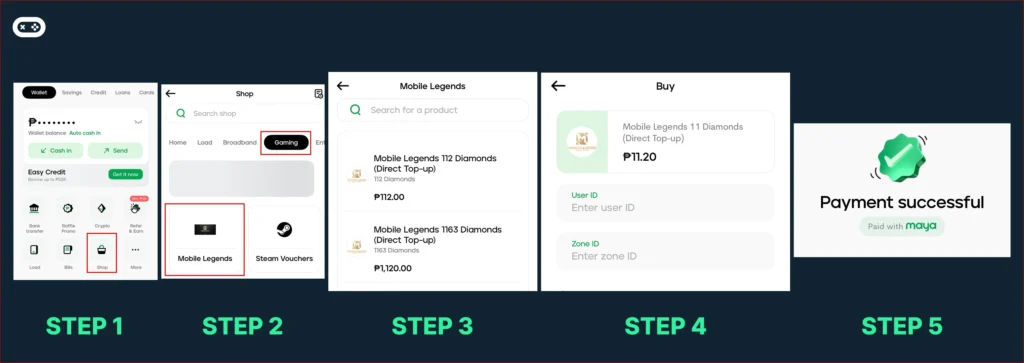
- Open the Maya app and log in.
- Tap “Shop” on the home screen.
- Tap “Gaming.” If you don’t see it right away, use the search bar at the top and type “Mobile Legends” or “Codashop.”
- Tap “Mobile Legends” to open the list of available Diamond tiers, all labeled “Direct Top-up.”
- Scroll through and pick the Diamond pack you want. Tiers run from small amounts like 11 Diamonds up to larger packs like 6042 Diamonds.
- Enter your User ID and Zone ID in the two fields on the checkout screen. Your full ID looks like 12345678(1234), where the first set of numbers is your User ID and the number in parentheses is your Zone ID. Type them in separately, the digits before the parentheses go in User ID, and the number inside the parentheses goes in Zone ID.
- Tap “Continue.”
- Review the order summary, then confirm and complete payment using your Maya wallet balance.
- Wait for the SMS or in-app confirmation. Diamonds usually arrive within a minute or two.
Make sure your Maya app is updated to the latest version before you start. Maya’s own item description flags this directly. An outdated app version can block you from completing direct top-up purchases, so it’s worth checking this first.
ML Diamond Price Tiers in the Maya App
The Diamond tiers inside Maya’s Gaming menu are listed as flat “Direct Top-up” prices. They’re not the same as Codashop’s promo pricing, and Maya’s in-app prices run a bit higher since they don’t carry Codashop’s website-only discounts and bonus Diamonds.
| Diamonds (Maya Direct Top-up) | Price in Maya App |
|---|---|
| 11 | ₱11.20 |
| 22 | ₱22.40 |
| 112 | ₱112.00 |
| 223 | ₱224.00 |
| 336 | ₱336.00 |
| 570 | ₱560.00 |
| 1163 | ₱1,120.00 |
| 2398 | ₱2,240.00 |
| 6042 | ₱5,600.00 |
For comparison, Codashop’s website runs ongoing promos with bonus Diamonds included. As of this writing, their 22 Diamond tier (20 + 2 bonus) runs ₱21.28, and their 336 Diamond tier (303 + 33 bonus) runs ₱319.20, both cheaper than the equivalent Maya in-app price.
💡 Tip: If saving a few pesos matters more to you than convenience, buying through Codashop and selecting Maya as your payment method at checkout gets you the better rate. If you’d rather stay inside the Maya app for a faster, fewer-taps experience, you’ll pay closer to the flat listed price. That’s a fair trade if you just want your Diamonds now. Either way, your Maya wallet funds the purchase. You’re just choosing which storefront to buy from.
Common Maya Top-Up Issues and How to Fix Them
Run into a hiccup? Here’s what’s probably happening and what to do about it.
- Diamonds didn’t arrive after payment. Don’t panic just yet. Most top-ups complete within 60 seconds, but server delays do happen during peak hours or big in-game events. Check your Mobile Legends mail inbox for a delivery confirmation before assuming something went wrong.
- You entered the wrong User ID or Zone ID. Reach out to Codashop support right away through their help center. Wrong-ID transactions usually can’t be reversed once processed, so the sooner you flag it, the better your chances.
- The transaction got declined. Nine times out of ten, this comes down to your wallet balance. Check that you have enough funds in Maya, or that your linked funding source hasn’t hit a limit.
- No SMS confirmation came through. Before you worry, check the Maya app’s transaction history first. The in-app record updates even if the SMS is delayed or doesn’t arrive at all.
Maya vs GCash for ML Top-Ups: Which Is Faster
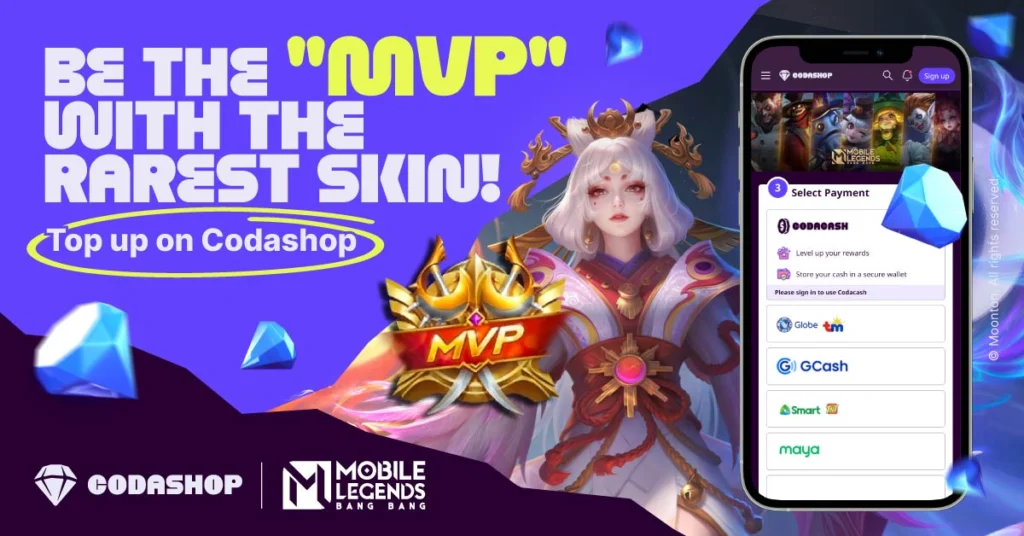
Both deliver Diamonds almost instantly once payment goes through. The real difference is where you’re buying from. Topping up directly inside the Maya app gets you Maya’s flat “Direct Top-up” pricing, while buying through codashop.com and selecting Maya at checkout often unlocks Codashop’s promo pricing with bonus Diamonds included. The same logic applies if you compare against GCash. If you’re weighing your options or want a side-by-side walkthrough, check out our guide on how to recharge Diamonds in ML using GCash.
Maya ML Top-Up FAQ
Paying with your Maya wallet balance doesn’t carry an extra Maya-side fee for gaming top-ups. If you’re funding the purchase through a linked card or bank transfer, your card issuer or bank may apply its own charges, so it’s worth checking the final amount on the order summary before confirming.
Yes. Enter their User ID and Zone ID instead of your own during checkout. Double check the details with them first since the transaction can’t be reversed.
Inside the Maya app, the smallest Direct Top-up tier is 11 Diamonds at ₱11.20. The largest listed tier is 6042 Diamonds at ₱5,600. Maximum purchase amounts beyond that depend on your Maya account verification level and wallet balance.
Most Diamonds arrive within a minute of payment confirmation. Delays beyond a few minutes are uncommon but can happen during high-traffic periods.
Yes. Maya’s gaming menu runs through Codashop, MLBB’s official top-up partner, so the transaction is secure end to end.
Follow Blooing on Facebook, YouTube, and TikTok for more Mobile Legends news and updates.
Editor’s Note: Codashop promos and GCash top-up steps don’t always stay the same. We’ll keep this guide updated whenever there’s a change, so you can rely on it for the latest and easiest way to recharge your Diamonds.







Leave a comment